Pick a mission
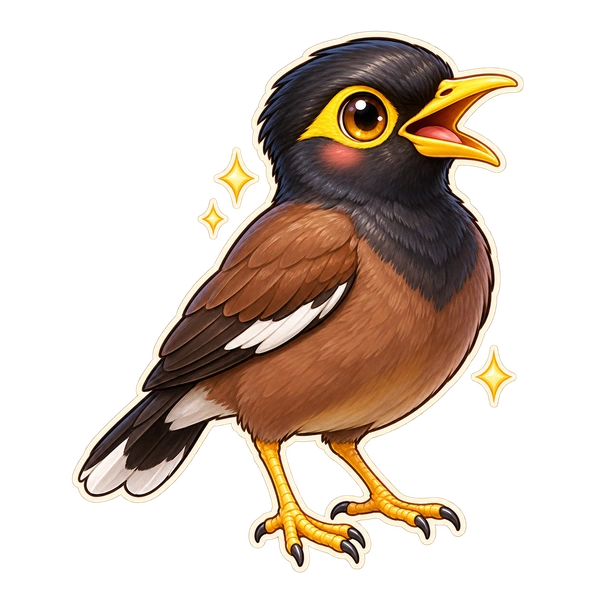
"Spot the Golden-Eye Town Crier." Fantasy names, real targets. One tap, no setup, no reading required for the youngest players.
Every WonderSpy mission names one real thing and dresses it up as a creature to hunt. Your child goes out looking, photographs what they think it is, and the app judges that one question: is this really a hibiscus? Then the WonderCard gives it back its real name, and a fact worth repeating at dinner.


Most "educational" apps ask for more screen time. WonderSpy is built to spend as little of it as possible — the game happens outside, in your child's own eyes.
"Spot the Golden-Eye Town Crier." Fantasy names, real targets. One tap, no setup, no reading required for the youngest players.
The phone goes down and the eyes go up. Missions are designed for a balcony, a lane, a park bench — never a road, water or a stranger.
The phone looks at the photo and decides whether it's the thing the mission asked for. When it isn't sure, it gets a second opinion. A miss gets a hint and another go — never a red cross.
The WonderCard drops the fantasy and names the thing: a hibiscus, a common myna, a rose-ringed parakeet. One surprising fact, and a question to go ask a grown-up. The fact is filed in the Wonder Book as a WonderNut.

Missions are short by design — one to five minutes, a handful of captures, no hard-fail timer and nothing that punishes a child for stopping. The app is trying to end the session, not extend it.
A camera is good at seeing. It is not good at knowing what it is looking at. So when the first look isn't sure, WonderSpy asks Apple Intelligence for a second opinion on the same photo — and that is what let us add 80 missions that name a real thing.
What it is not: WonderSpy is not a bird book. You can't point it at any bird and be told what it is. Each mission asks for one thing, and the app's only job is to say whether your child found it.
The phone studies the photo by itself and picks out what it can — the shape, the colour, the thing in the middle. Quick, and usually enough on its own.
If the phone isn't sure, Apple Intelligence reads the mission and looks at the photo, and answers one plain question: is this really a hibiscus? It isn't told what the first look thought, so it can't simply agree.
The second opinion is a vote, not the verdict. It can save a find the phone nearly missed. It gets a couple of seconds, and if the answer doesn't arrive the game carries on without it.
Before, a mission could only ask for a kind of thing — a flower, a bird, something red. Now it can ask for a hibiscus, a red-vented bulbul, an autorickshaw, a pine cone — and tell honestly whether your child found it.
The first look happens on your phone. The second opinion goes to Apple Intelligence, and Apple decides whether to answer on the phone itself or on Apple's own secure servers. Either way it goes to Apple, never to us — all we ever hear back is yes or no.
The 80 name-a-real-thing missions need an iPhone that supports Apple Intelligence, and may want a connection. The app simply shows your child the missions your phone can handle — nothing is offered and then broken.
A child chases a "Crimson Trumpet Sprite". The thing the mission was really about is a hibiscus — and that is exactly what the card tells them once they've found it, with a fact they will repeat to somebody within the hour.
Common Myna
Golden-Eye Town Crier
Mynas walk instead of hopping, and a pair will keep the same partner for years — which is why you almost always see two.
👀 Watch from where you are. We never ask you to get closer to an animal.
A WonderLand is a place a child discovers by finishing the missions inside it. Every one of them works from where your family already is.
Leaves, flowers, seeds and trees. The greenest place of all is right outside your door.
Birds, bugs, cats and dogs all live near you. Go and find who is out there today.
Your home is full of hidden treasure. Look on the shelves, under the sofa and behind the door.
Red, blue, yellow, green. Every colour is hiding somewhere. Can you find them all?
Cars, buses, bikes and big road signs. Nothing in this town ever stands still!
Nobody plays here on their own. Bring a friend or a grown-up and hunt together.
Shape City and Peek Street are built and waiting in the wings.

Children don't return for streak pressure. They return because there is one more Wonder missing from the book, and because they like who they are becoming inside the game.
Not everything — just the parts parents ask about first.
Your child's photos are kept on the phone. The first check happens there; the second opinion goes to Apple Intelligence, which Apple answers either on the phone or on Apple's own secure servers. Neither one sends the picture to us.
No mission asks a child to approach an animal, a road, water or a stranger. Outdoor missions check for daylight, and the app breaks in with a look-up reminder rather than letting a child walk head-down.
There is no advertising in WonderSpy, no tracking software from other companies, and nowhere in the app a stranger can reach your child.
On screen time. WonderSpy doesn't set its own time limits in this version. If you'd like one, iOS Screen Time can set a daily limit for it — Settings › Screen Time › App Limits.
On usage data. The app keeps an anonymous record of how it is used — which missions get started and finished, whether a photo worked, when something crashes — so we can fix what's broken and make the missions better. It is never sold, never shared with advertisers, never includes your child's photos, and you can switch it off in Grown-ups → Privacy preferences. The Privacy Policy lists exactly what's in it.
WonderSpy is built for iPhone first. Android is next.
Scan the code with your phone camera, or tap the button below. WonderSpy works on recent iPhones; a few missions need a newer one, and the app only ever shows your child the missions their phone can handle.

Scan with the iPhone camera app
No account needed to start playing.
Android is on the roadmap — we're getting it right on one kind of phone first, rather than shipping a worse version of it on two.
Tell us where to send the link and you'll hear from us once, when it's ready. Nothing else.
One email, at launch. We don't run a newsletter.
No — and it's worth being clear about it, because a lot of apps in this space do exactly that and WonderSpy doesn't. It isn't a field guide. Each mission picks one thing in advance — "Spot the Golden-Eye Town Crier", which is a common myna — and the app's whole job is to answer one question about the photo your child takes: is this that thing? Point it at an unrelated bird and it won't name it; it will tell your child this isn't what the mission asked for and suggest another go.
What your child ends up knowing is real all the same: finish that mission and they know what a myna is, what it looks like and one true thing about it. Across 80 named missions, that adds up.
Looking at one photo and answering one question — never naming a thing by itself. When the phone's first look isn't sure a find matches the mission, WonderSpy shows Apple Intelligence the same photo and what the mission asked for, and asks whether it really is a hibiscus. The answer is a vote, not the verdict — the game's own rules decide what counts — and if it doesn't come back in a couple of seconds the game carries on without it.
Worth being exact about one thing: this part is Apple Intelligence, not something we run. Apple decides whether to answer on your phone or on Apple's own secure servers, and Apple says that what it handles there is used only to answer the question, isn't kept, and isn't available to Apple. The half we can promise is ours: the photo never reaches WonderSpy, and all we get back is yes or no.
Not for most of it. WonderSpy runs on recent iPhones, and your child can play the great majority of the missions on any of them.
The 80 missions that ask for a specific bird, flower or object need an iPhone that supports Apple Intelligence, because that's what checks them. If yours doesn't, those missions simply aren't shown — nothing is offered to your child and then fails on them. If you're not sure whether your phone qualifies, just install it: the app works out what it can do and shows the missions to match.
Mostly, yes. The missions are kept on the phone and the first look happens there, so a park, a basement or a train with no signal is fine, and progress catches up when you're next online. The part that may want a connection is the second opinion — and if it can't run, the game goes with what the phone decided on its own rather than making your child wait.
No. There is no sign-up, no email and no password. The app creates an anonymous Explorer ID on the device to keep progress safe, and that's the whole of it. You can see the ID — and quote it to support@wonderspy.app if you ever want your data deleted — in Grown-ups → the version footer.
Your child's progress, saved against that anonymous Explorer ID, and an anonymous record of how the missions perform — started, finished, whether a photo worked, when something crashed. No name, no email, no date of birth, no location, nothing that advertisers use, and never your child's photos. You can switch the usage record off in Grown-ups → Privacy preferences. The full detail is in the Privacy Policy.
There is no way to. There is no chat, no public profile, no leaderboard and no free-text field anywhere a child can reach — the only place anybody types anything is the feedback form, which sits behind a parent gate.
It says so, and offers another go. A missed capture gets feedback, a hint or another route to finishing — never a dead end and never blame. And when the first look is unsure, the second look often rescues a find that was right all along. Because the app is only ever judging one named target rather than guessing from scratch, it can say "that isn't it" honestly instead of inventing a name.
Not inside WonderSpy — this version doesn't enforce its own daily limits, and we'd rather say so than show you a switch that does nothing. iOS Screen Time can set one for the app today: Settings › Screen Time › App Limits. Missions themselves are short by design, one to five minutes each.
Write to support@wonderspy.app — there's a contact page with what to include. There's also a feedback form inside the app, behind the parent gate, in Grown-ups → Send feedback.
Five minutes today. A name they'll still know in ten years.